We’ve all been there: frantically hunting for a charger while every plug in the house is occupied. With modern tech taking over every aspect of our lives, from phones to smart gadgets, USB socket outlets are becoming a must-have in Cornwall homes. But how do you know when it’s time for an upgrade? And what does the process involve? Let’s dive into why USB sockets are the smart choice for your home and how you can go about upgrading your old outlets.
Why Consider USB Socket Outlets for Your Cornwall Home?
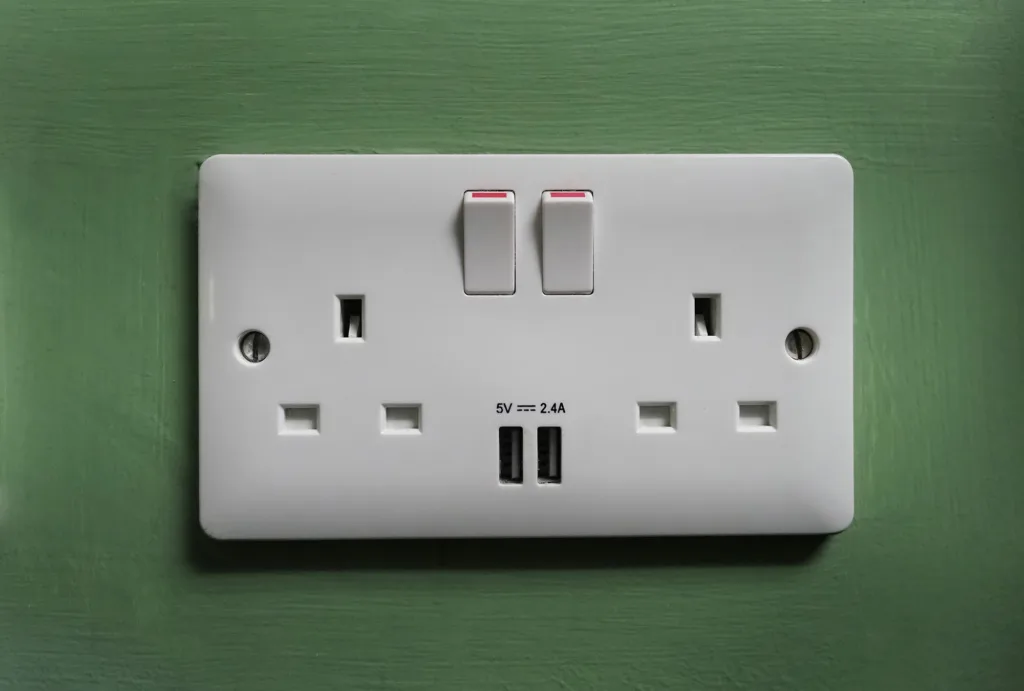
USB socket outlets bring convenience and flexibility that traditional outlets simply can’t offer. By incorporating a charging point directly into the outlet, you eliminate the need for separate adaptors, making charging more accessible and less cluttered. Here’s why they could be a great addition to your home.
Convenience of Integrated Charging
Imagine plugging your phone straight into the wall without needing to hunt down a charger. USB outlets let you do just that, offering built-in USB ports alongside your standard sockets. This is especially helpful in high-traffic areas like the kitchen or living room, where everyone seems to need a charge at the same time.
Reduced Clutter and Adaptors
With USB outlets, you can say goodbye to tangles of chargers and bulky plugs. Since most USB devices only need a cable, you’ll free up space around your outlets and reduce the visual clutter in your home. This might sound like a small change, but it makes a noticeable difference in rooms like your office or bedroom.
Enhanced Device Compatibility (Type A and Type C)
The world of USB ports can be confusing, but many modern USB sockets come with a mix of Type A and Type C ports. This allows you to charge a wide range of devices, from older gadgets to newer ones, without having to switch plugs or cables. Now, you can charge everything from your phone to your laptop at a single outlet.
How to Choose the Right USB Socket Outlet
Upgrading to USB sockets isn’t just about convenience—it’s also about getting the right product for your needs. There are various types available, each with different features that suit different areas of the home.
Single vs. Double USB Sockets
Single USB sockets are ideal for rooms where you only need to charge one device at a time, like bedrooms or smaller workstations. However, double USB sockets can be much more practical in spaces like living rooms or home offices, where multiple devices may need charging simultaneously.
Additional Features to Look for (Smart, Gang Sockets)
Some USB sockets come with advanced features like smart technology, allowing you to control them remotely via your smartphone. Gang sockets, which combine USB ports with traditional plug points, are another useful option, especially in kitchens where you might need to charge devices while also using appliances.
Aesthetic Options to Suit Your Home
USB sockets come in a range of finishes, from sleek chrome to classic white, so you can choose one that complements your home décor. This means you don’t have to compromise style for functionality.
Are USB Socket Outlets Safe?
Safety is always a concern when dealing with electrical installations, and USB sockets are no exception. However, as long as you choose a product that meets UK safety standards, such as BS 1363 and BS 5733, you can rest assured that you’re making a safe investment.
Built-in Safety Features (Overload, Surge Protection)
Modern USB sockets come equipped with essential safety features like overload protection and surge protection. These features help prevent electrical mishaps by cutting off the power if too much electricity is drawn, protecting both your devices and your home.
Meeting UK Standards (BS 1363 and BS 5733)
Always make sure that the USB sockets you choose comply with British Standards, which ensure they’ve been rigorously tested for safety. For more information on these regulations, check out UK Electrical Safety Standards.
Step-by-Step Guide to Installing USB Sockets
Installing a USB socket may seem like a daunting task, but with the right approach, it can be straightforward. However, knowing when to DIY and when to call in a professional is key.
DIY Installation Tips
For a basic installation, start by turning off the power and unscrewing your old outlet. Carefully disconnect the wires and then connect them to the corresponding points on your new USB socket. Screw the socket back into place, restore the power, and test the outlet by plugging in a USB device.
When to Hire a Professional Electrician
While DIY might be tempting, it’s important to know when to get help. For homes with older wiring or when installing multiple sockets, hiring a professional is often the safer route. Contact us for professional installation advice.
Best Locations in Your Home for USB Sockets
Not all rooms in the house need USB sockets, but certain areas will benefit more from having them installed.
Kitchen and Living Room
These high-traffic areas are prime spots for USB sockets, as they often serve as gathering places for the whole family. Installing a double USB socket here can ensure that everyone has a place to charge their devices without cluttering up the room.
Home Office and Bedrooms
Your home office is another ideal place for USB sockets, especially if you’re working remotely and have multiple devices that need charging. Bedrooms also benefit from USB sockets, as they provide an easy way to charge your phone overnight. Learn more about installing double sockets in your home.
Regulations for Upgrading Electrical Outlets in Cornwall
When upgrading electrical systems in your home, it’s important to follow Cornwall’s local regulations to ensure safety and compliance.
Adhering to Cornwall’s Local Electrical Regulations
Whether you’re installing the sockets yourself or hiring a professional, make sure that all electrical work complies with local building regulations. This may include notifying your local authority or hiring a certified electrician to carry out the work.
Approved Electricians and Standards
It’s always best to hire an electrician who is Part P certified to ensure they meet government standards for electrical work. Explore rewiring and new installation services.
FAQs
Are USB sockets compatible with all devices?
Yes, most USB sockets are compatible with a wide range of devices, including smartphones, tablets, and smartwatches. Some sockets even come with both Type A and Type C ports for added flexibility.
Can I install USB sockets myself?
While it’s possible to install USB sockets yourself, it’s recommended to hire a professional if you’re unfamiliar with electrical work, especially for more complex installations.
How many USB sockets should I install in my home?
This depends on your household’s needs. Installing one in high-traffic areas like the living room and kitchen, plus one or two in bedrooms and the home office, usually covers most people’s needs.
Conclusion
Upgrading to USB sockets in your Cornwall home isn’t just about keeping up with technology—it’s about making life easier. From decluttering your space to making charging more accessible, these outlets are a simple yet effective way to modernise your home. Not sure where to start? Explore more socket upgrade services at Wave Electrical Solutions and get your home future-ready today.